Hand in your master.Get your release back.
Pod checks your audio against the requirements of streaming services and radio, adds all the metadata and builds a package you can upload to DistroKid straight away. Pod never touches your sound.
- Free with your SoundSprout account
- WAV, FLAC and AIFF
- Nothing gets mastered or normalised
- 01Upload your master
- 02Clear the check
- 03Download the package
Four steps. The last one is a zip.
Pod follows the same order as the DistroKid upload form. What you fill in here, you only have to copy over there.
Upload
Drop in your WAV, FLAC or AIFF. An MP3 works too, then Pod tells you to ask for the master.
Check
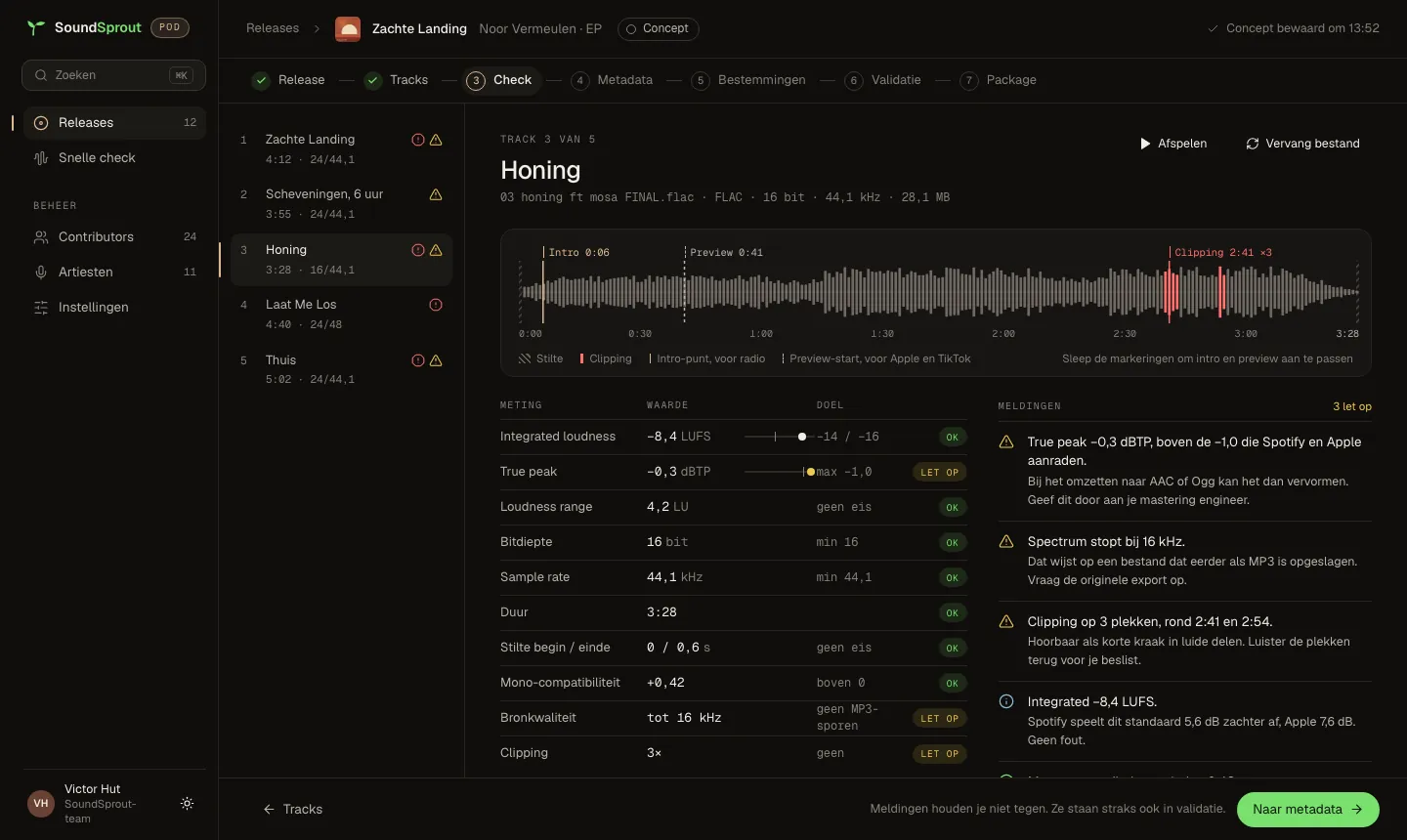
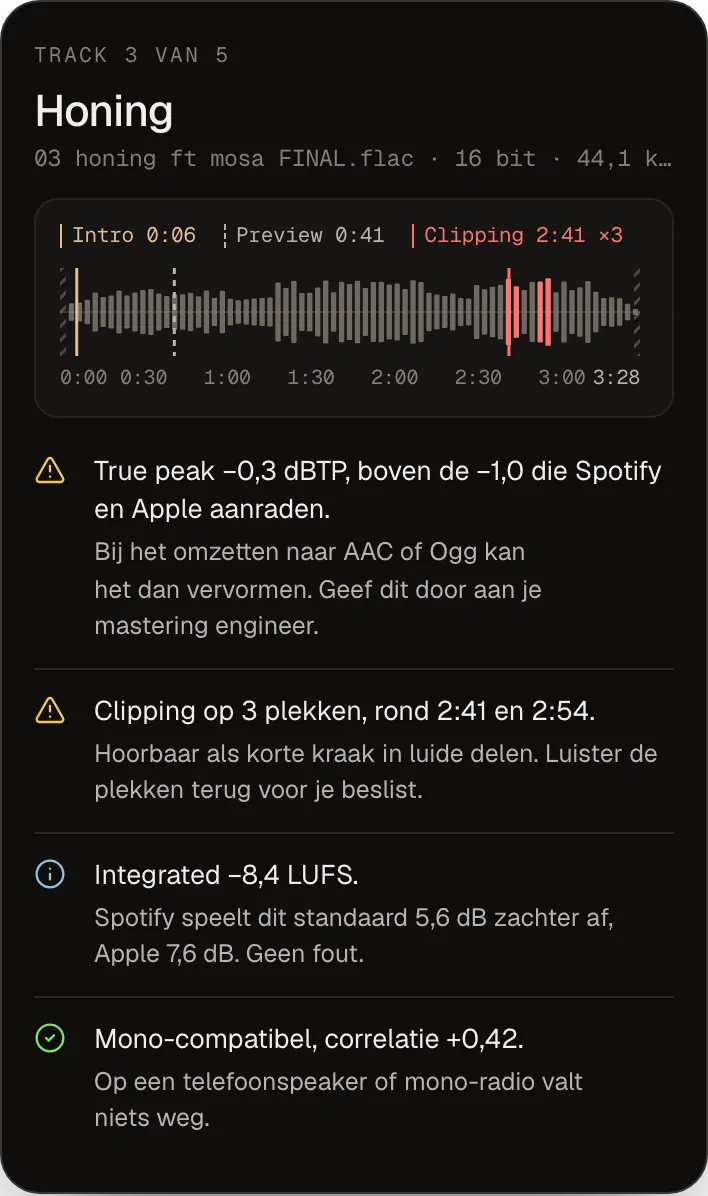
Pod measures true peak, clipping, silence and phase, and explains in plain language what it means and why it matters.
Metadata
Release, tracks, artists, songwriters with their legal names, splits, credits, lyrics and the AI disclosure. Whatever was already in your file is ready as a suggestion.
Package
Pod makes tagged copies per destination and puts everything in one zip. You get an email when it is ready.
52 rules. Every rule says why.
No red cross without an explanation. Every notice says exactly what streaming services, DistroKid or radio require, so you spot it yourself next time.
Audio
True peak above -1 dBTP, clipping in the source, long silence at the start or end, DC offset, mono compatibility, a lossy source or a spectrum that stops early.
Metadata
"feat." in the title, a version in the title, an ISRC that is already in use, splits that do not add up to 100%, a missing explicit flag, a songwriter without a legal name.
Artwork
Square and at least 3000 by 3000, sRGB, JPG or PNG, and the text on the cover matching your metadata.
Featured artists go in the featuring field. In the title it breaks the link with the guest artist's profile.
Blockers stop the package.
Warnings you may consciously ignore; that is then noted in the check report.
One zip. Four destinations.
Every destination gets its own copy with the right tags, name and folder. No more fiddling with mp3tag.
Distribution
Your master, tagged. The audio data is byte for byte identical to what you handed in; Pod checks this on every export.
Radio NL
WAV and MP3 320 with title and version in the name, plus a radio sheet for your plugger.
Promo
MP3 320 with the artwork embedded, for press, playlist curators and your own Stem page.
CD 16-bit
Only if you ask for it. WAV 16 bit with TPDF dither, 44.1 kHz, never upsampled.
Also in the zip: a release sheet in the order of the DistroKid form, distrokid.csv, credits, lyrics per track, artwork at 3000 and 1400 pixels, and the check report as a PDF.
- Zachte Landing · Noor Vermeulen.zip
- Distributie/ 5 WAV
- Radio NL/ 5 WAV · 5 MP3 · radio sheet
- Promo/ 5 MP3 · artwork
- Cd 16-bit/ 5 WAVon request
- Artwork/ 3000 px · 1400 px
- Lyrics/ 5 TXT
- Release sheet.pdf
- distrokid.csv
- Credits.pdf · credits.csv
- Checkrapport.pdf
Example with a fictional release.
Copyable fields
Open the release sheet in Pod and copy every field with one tap, in the order DistroKid asks for them.
Pod does not edit your sound.
No mastering, no loudness normalisation, no EQ. Only format conversion where a destination asks for it: resampling with soxr and never upwards, 16 bit with TPDF dither, MP3 at 320 kbps. After every copy Pod reads the tags back and compares the audio data with your original. If something is off, you get a notice instead of a package.
- Loudness for information only
- Distribution copy byte-identical
- Every copy read back
Every package has a recipe.
Pod keeps exactly which settings, tags and files went into each package. Does your ISRC arrive from DistroKid later, or is a credit wrong? Fix it and build the package again. Same recipe, same result.
Pod is the Release step. The rest connects to it.
Pod is part of SoundSprout, the growth platform for independent artists. One account, every product at its own moment in your journey.
You are here.
Your cover and every promo format for the same release, with a check against distributor requirements.
Turn the same track into the videos for your ads.
Want more? Our marketing team uses the same package for your pitch, your plugger and your campaign.
See SoundSproutFree. Really.
Pod comes with your SoundSprout account. No trial period and no limit on the number of releases; you get 20 GB of storage per artist. Create an account at app.soundsprout.nl and Pod is ready for you.
Questions artists ask us
What does Pod cost?
Nothing. Pod comes with your SoundSprout account, with no limit on releases or tracks. You get 20 GB of storage per artist.
Does Pod change anything about my master?
No. The distribution copy is byte for byte identical to your file. Only for radio, promo and CD does Pod make a converted copy, and that is not mastered or normalised either.
Which files can I upload?
WAV, FLAC and AIFF. MP3 works too, but you get a warning: every conversion from an MP3 costs quality. Ask your mixer for the WAV.
I do not have an ISRC yet. Can I continue?
Yes. Set the source to "comes from distributor" and DistroKid assigns the codes. Fill them in in Pod afterwards and build the package again, so the radio copies carry the right code.
How long does building a package take?
A single is ready within a few minutes. An album with ten tracks and every destination takes a little longer. You get an email as soon as the zip is there, so you do not have to wait.
Does Pod work for a label or manager?
Yes. With one account you manage several artists, each with their own releases and contributors; you switch artist at the top. For now DistroKid assigns the ISRCs.
What does SoundSprout do with my files?
They are stored in a European environment (Frankfurt) and only available to you and the people you add. We keep zips temporarily; you can delete a release with everything in it yourself, including from storage.